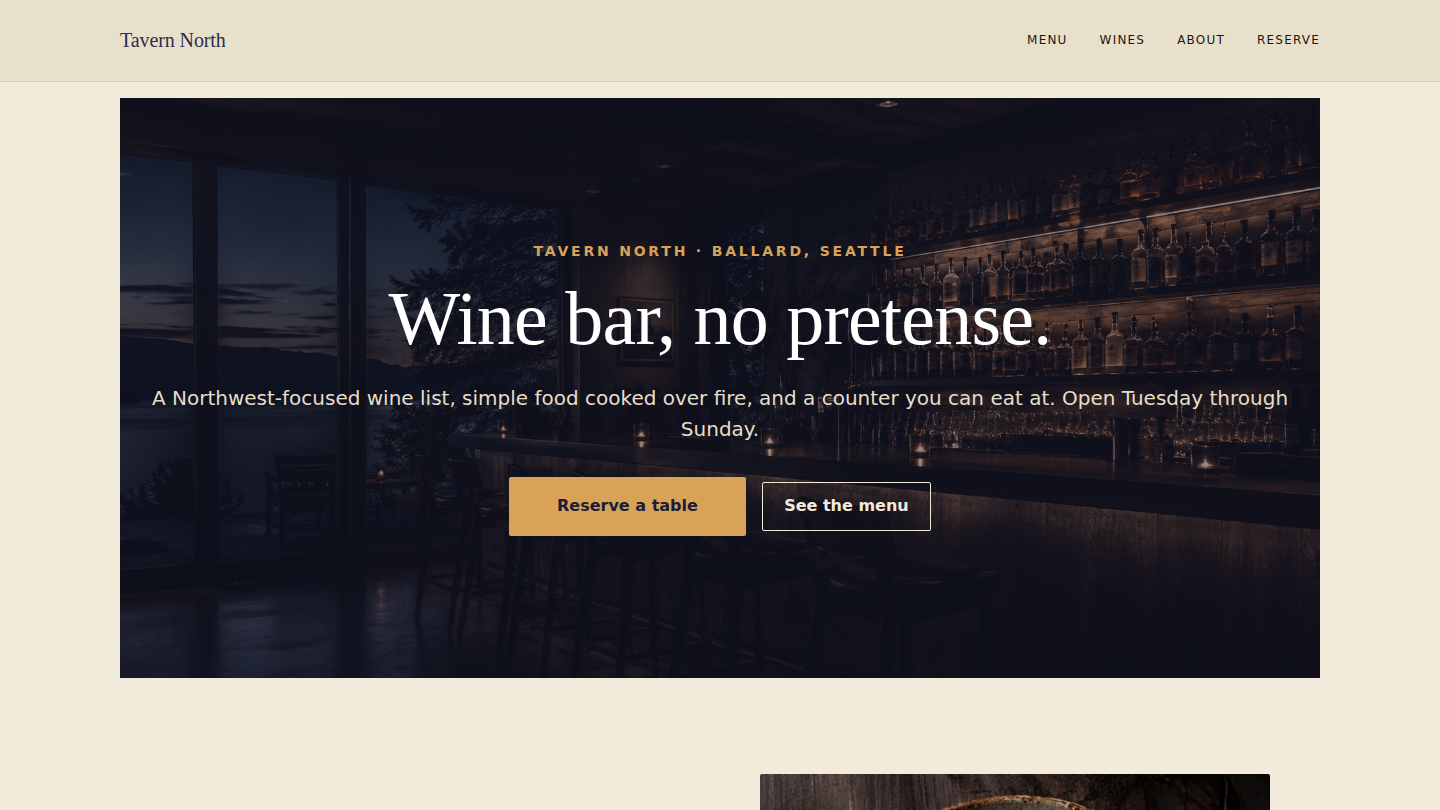
A fictional neighborhood wine bar in Ballard — Tavern North — built to argue that WordPress is still the right stack for hospitality and small-business marketing sites. Fourth demo on the platform, and the first consumer of a new shared block (sfp-blocks/menu-section) that any future food or drinks demo can drop into a page without rebuilding the dotted-leader, badge, and price-row layout from scratch. Live at winebar.wp.philiprehberger.com.
The challenge
Restaurants get sold Squarespace or Toast’s bundled marketing site. Wine bars often end up on Instagram with a Linktree. WordPress gets skipped on reflex for hospitality — there’s a perception that food and drink sites are too design-driven for a CMS, or too marketing-light to justify the editor experience. The narrative the small-business hospitality market hears is: “WordPress is for blogs and stores; for everything else, use the SaaS site builder that came bundled with your reservation system.”
That narrative is wrong on three axes that hospitality actually cares about. Menus change weekly — front-of-house staff need to be able to swap a dish or update a price in under thirty seconds without involving a developer. The story of the place — the room, the cellar, the people behind it — wants long-form copy and a credible typographic system, not a single-screen “About” tab. And the operational reality (hours, location, reservation flow, allergen disclosure) wants structure, not a Linktree. Tavern North is the worked example that WordPress handles all three without a page builder or a hosted website service in between.
The approach
A per-demo theme (winebar) on the platform chassis, paired with a new shared block (sfp-blocks/menu-section) that drives both the food Menu and the Wines list. The theme owns its own identity — aubergine navy primary (#2A2E4A), brass accent (#D9A357), warm cream background (#F2EBDC), DM Serif Display for headings against a system sans for body — plus its own header (Menu / Wines / About / Reserve) and footer (bar bio + hours + reservation CTA). Everything else inherits from the shared platform.
The new block is the part worth lingering on. Every food or drinks demo will need the same primitive: a section title, an optional sub-copy, and a list of items where each item has a name, a price, an optional description, and optional flags (V vegetarian, GF gluten-free, somm pick). The block renders all of that server-side, with a CSS Grid row — name on the left, dotted leader filling the middle, price on the right — that reads like a printed menu instead of a stacked HTML table. Flags render as small-caps brass pill badges. Two consumers on day one: the four-section food Menu page (Small plates / From the fire / Cheese / Desserts) and the four-section Wines list (Bubbles / Whites / Reds / With dessert). Same block, same CSS, different content arrays.
What’s on the site
- Home. Navy hero with brass eyebrow (“Tavern North · Ballard, Seattle”), DM Serif Display headline (“Wine bar, no pretense.”), reservation + menu CTAs, then two-column kitchen / cellar teasers and a closing reservations strip
- /menu/. Four
sfp-blocks/menu-sectioninstances: Small plates, From the fire, Cheese, Desserts. Each item carries a name, price, optional description, and optional flag badges - /wines/. Four more menu-section instances (Bubbles / Whites / Reds / With dessert) using the same block — no special-cased “wine list” markup anywhere
- /about/. Long-form narrative about the room, the food philosophy, the wine philosophy, the people, and the operational details (hours, neighborhood, walk-in vs reservation policy)
- /reserve/. Reservation page that demonstrates the layout — the live OpenTable / Resy integration is intentionally left for the real client engagement; the demo shows the page structure, the copy, and the call to action without committing to a specific vendor
- Demo banner across the top of every page making it explicit that the bar is fictional
The stack in detail
_chassisparent theme — templates, parts, patterns, gotcha-busting CSS, filemtime-based stylesheet enqueue. Inherited from the platform via symlinkwinebarper-demo theme (this repo) — declaresTemplate: _chassis, ships the aubergine-navy + brass + warm-creamtheme.json, DM Serif Display + system sans typography, customparts/header.html(Menu / Wines / About / Reserve) andparts/footer.html(bar bio + hours + reservation CTA)sfp-blocks/menu-section— the new shared block, server-rendered, lives atplugins/sfp-blocks/src/menu-section/in the platform repo. CSS Grid name-leader-price row with a dotted-border leader that reads like a printed menu. Flag badges in small-caps brass pills. First consumers: winebar’s Menu + Wines pages; available to every future food or drinks demosfp-blocks/portfolio-grid,sfp-blocks/trust-stack,sfp-blocks/test-card-helper,sfp-blocks/product-comparison— inherited from the shared plugin (not consumed by winebar)- Four
sfp-*mu-plugins inherited from the platform;winebar-banner-config.phpfilters the demo banner copy for hospitality - WordPress 6.x · PHP 8.3 · MySQL 8 on Apache 2.4 (the same EC2 t3.small that hosts every other demo on the hub)
.scripts/seed-pages.sh— idempotent five-page seed that resolves placeholder vs supplied photos, uploads viawp media importwith the standard<name>-imageattachment-slug rename, creates or refreshes all five pages, and pins Home as the front page
Where we made tradeoffs
Building the menu-section block now, instead of inlining a one-off pattern. The first instinct was to write a custom HTML pattern in winebar’s theme directly — faster to ship, no block plugin work, no platform deploy. We built the shared block instead because the next hospitality demo will need exactly the same primitive, and the developer building it (often a future me, six months on) shouldn’t have to reverse-engineer the dotted-leader CSS and the flag-badge styling from a one-off pattern buried in a theme. The block added about thirty minutes to the build — registering it in plugins/sfp-blocks/src/menu-section/, writing the JSON attribute schema for the sections array, the render.php, the SCSS — and it saves a multiple of that on every subsequent food, drinks, or menu demo. Platform investment over local optimization.
The dotted-leader CSS technique vs a flat layout. Most restaurant websites render menu items as a stacked table — name on one line, description on the next, price right-aligned somewhere nearby — because it’s easier to write and survives narrow screens without thought. We went with the printed-menu convention instead: name on the left, price on the right, a dotted leader filling the space between. The implementation is CSS Grid with a middle span for the leader, a 1px dotted border on the bottom of that span, translated up by a quarter em so it sits on the baseline. The cost is a slightly more delicate stylesheet (the leader’s transform: translateY has to track the font’s x-height); the benefit is that the menu reads like a wine bar would actually print it, which matters for the genre. Mobile collapses gracefully — the grid stays the same shape, the leader just shortens.
Hours of operation as static prose, not a structured “hours” widget. The schema.org-perfect answer for a real production restaurant is a structured hours block that emits machine-readable JSON-LD for Google’s restaurant pack and renders human-readable copy from the same source. For a portfolio demo it would have meant another custom block — or ACF, or both — and Tavern North’s hours are static enough (“Tuesday through Sunday, 5pm to 10pm”) that a paragraph in the footer and on the About page hits 95% of the value at 5% of the build effort. The structured-hours upgrade is a clean future addition when a real client engagement justifies the extra block. Documenting it as a deferred decision here so the next hospitality build doesn’t relitigate it.
Outcomes
- Five-page hospitality marketing site live at winebar.wp.philiprehberger.com, end-to-end provisioned via the platform’s
provision-demo.shscript - One new shared block authored, deployed, and committed to the platform —
sfp-blocks/menu-sectionis now available to every future food or drinks demo with zero additional integration work, and the dotted-leader / flag-badge CSS lives in one place instead of being copy-pasted around - Lighthouse: 99 / 96 / 100 / 92 (perf / a11y / best-practices / SEO) on the homepage with placeholder photography. The chassis’s asset hygiene — dequeueing unused WooCommerce assets on non-WC routes, filemtime-based cache busting, no JavaScript on the marketing pages — continues to pay off without any per-demo perf tuning
- Greenfield-to-live in approximately four hours including the new shared block, the per-demo theme, the full five-page seed, and the case-study writeup. Improvement on Hillcrest’s five hours and Pulsar’s six, consistent with the platform getting more leveraged with each demo — most of the work was the new block, and the next hospitality demo gets that work for free
- Confirms the per-demo-theme + shared-block split as the standard pattern across the platform now (shop, pulsar, hillcrest, winebar — four for four). Identity lives in the demo, primitives live in the platform, neither side has to compromise