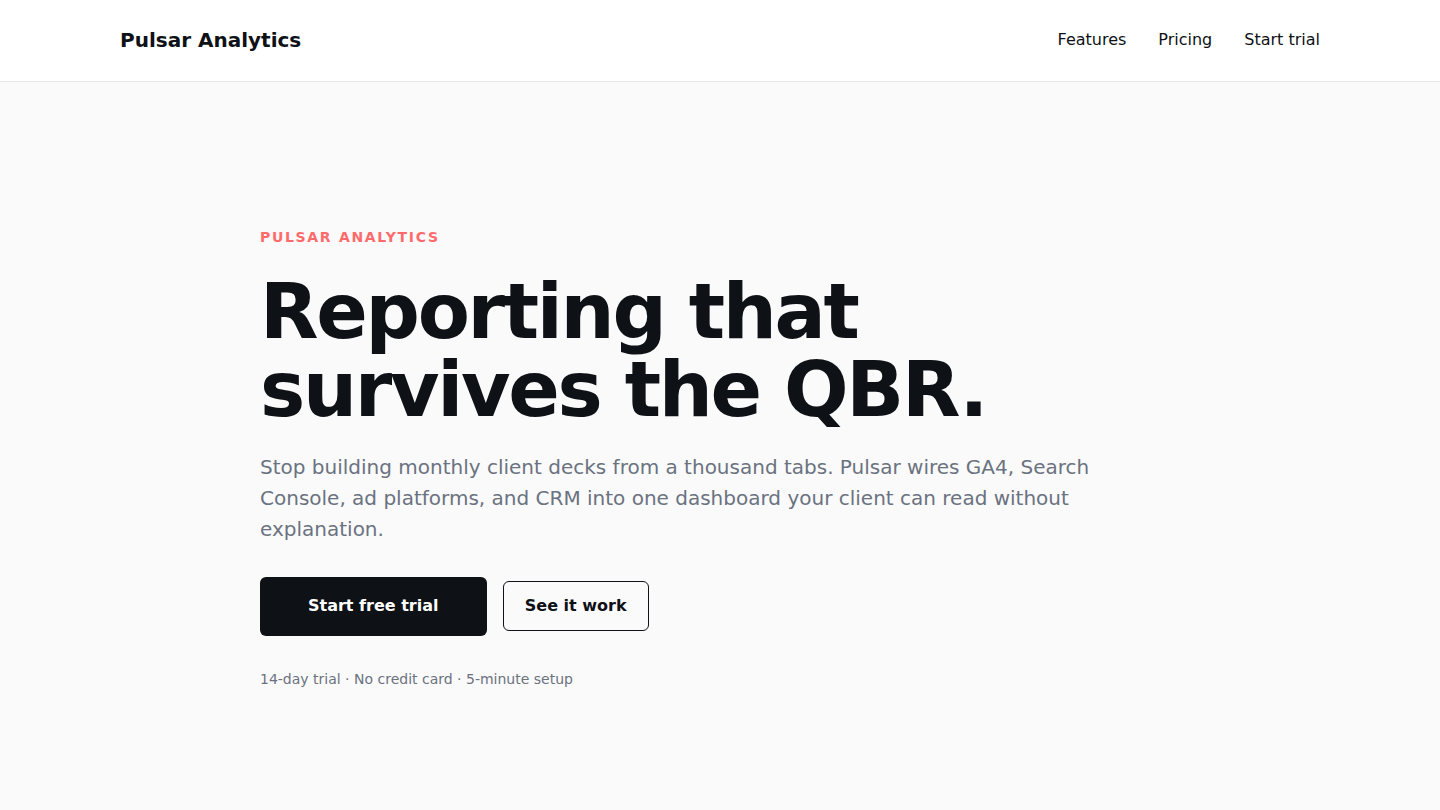
A fictional B2B analytics SaaS landing page built to show that WordPress is still a serious choice for modern product marketing sites — without theme bloat, page builders, or “framework” wrappers around a CMS that already does the job. Live at pulsar.wp.philiprehberger.com.
The challenge
Most agencies pick Webflow, Framer, or a bespoke Next.js build for SaaS marketing sites and skip WordPress on reflex. The assumption is that WordPress means “page builder soup” or a heavy theme that fights you on every layout decision. The mental model is that WordPress is for blogs, content sites, and stores — anything else needs a different stack.
That model was right ten years ago. It hasn’t been for the last five. Full Site Editing landed in WordPress 5.9 and the block editor has since become a reasonable rich layout system if you treat it like one. Pulsar exists to push back on the reflex — a real SaaS landing layout (hero, social proof, three-column feature grid, three-tier pricing, testimonial, four-item FAQ, two-color CTA strip) implemented with stock WordPress block primitives plus a small custom block for the trust-stack stat row. No page builder, no framework wrapping the CMS, no shadow DOM.
The approach
Built on a shared platform that hosts every demo on this hub. The parent theme (_chassis) ships templates, parts, patterns, and a layer of gotcha-busting CSS that catches the WordPress + WooCommerce friction points that normally eat an afternoon each. Demos inherit it all via symlinks on the server.
The Pulsar demo overrides only what’s genuinely demo-specific. The chassis’s front-page.html is a pattern composition (the shop demo uses it to assemble a homepage out of reusable patterns), which doesn’t suit a SaaS landing layout where the home page IS the landing page. So Pulsar ships its own per-demo theme — a thin child of _chassis with a Volt-aligned ink + coral theme.json, its own front-page.html that renders core/post-content from the static page, and pulsar-specific header (Features / Pricing / Start trial) and footer parts.
Everything else — the testimonial, FAQ, and CTA patterns; the trust-stack custom block; the demo banner; robots config; SMTP routing through the platform-wide mu-plugin — is shared infrastructure. Deploy once, every demo gets the fix.
What’s on the page
- Hero with category eyebrow, serif headline (clamp-scaled with -0.03em letter-spacing), sub-copy, primary + outline CTAs, and trust microcopy
- Custom
sfp-blocks/trust-stackblock — server-rendered animated counter row, four configurable stats (340+ agencies / 12M reports sent / 4.8★ rating / 2 min average setup) - Three-column feature grid with numbered coral eyebrows + headline + sub-copy per feature
- Three-tier pricing table (Starter / Studio / Agency) with a “Most popular” badge, distinct feature lists, and per-tier CTA treatment
- Customer testimonial inlined directly in the page composition (the chassis testimonial pattern was extracted to keep the demo self-contained)
- Four-item FAQ rendered with native HTML
<details>blocks — no JavaScript, full keyboard support, accessible by default - Bottom CTA strip with ink background + coral accent button
The stack in detail
_chassisparent theme — templates, parts, patterns, gotcha-busting CSS, filemtime-based stylesheet enqueue. Symlinked from/var/www/wp/shared/platform/themes/_chassispulsarper-demo theme (this repo) — declaresTemplate: _chassis, ships the Volt palette (ink, coral, soft cream), ownsparts/header.html,parts/footer.html, andtemplates/front-page.htmlsfp-blocks/trust-stack— server-rendered Gutenberg block with IntersectionObserver-triggered count-up animation, configurable stats array- Four
sfp-*mu-plugins (sfp-demo-banner,sfp-robots,sfp-smtp,sfp-wc-defaults) — inherited from the platform;pulsar-banner-config.phpfilters the demo banner copy - WordPress 6.x · PHP 8.3 · MySQL 8 on Apache 2.4 (HTTP/2 deferred until the PHP-FPM migration)
.scripts/seed-pages.sh— idempotent single-page seed that creates or refreshes the front-page composition viawp post update(pipes block markup through stdin).scripts/deploy.cjs— Node-based deploy usingrsync+node-sshwith WSL-safe key staging, runswp cache flushon every push
Where we made tradeoffs
Three decisions worth naming.
The per-demo theme override pattern. When we first deployed Pulsar, it activated the standard Volt theme and inherited the chassis’s front-page.html. The result was a shop-style pattern composition rendered as the homepage, with stub patterns instead of the Pulsar landing layout — the static page’s post_content was ignored entirely. The fix was a minimal per-demo theme that overrides only front-page.html to render core/post-content. That pattern is now standard practice across the platform: shop, pulsar, and hillcrest all own per-demo themes; the chassis stays generic.
A class-name collision that bleached the pricing tier cards. WordPress’s block-borders support adds .has-border-color as a marker class on any block with a custom border. The chassis palette also includes a slug literally named border, which causes WP’s palette-to-utility pipeline to emit .has-border-color { color: var(--wp--preset--color--border) !important; } — using the same class name. Every bordered block (the pricing cards, the FAQ <details>, anything with a custom border-color) had its inner text forced to the border hex, rendering near-white on white. The fix is documented in the platform guide’s gotchas appendix as gotcha #20; the long-term cleanup is to rename the palette slug.
Inlining patterns vs referencing them. The first build of Pulsar pulled in the chassis’s testimonial, FAQ, and CTA patterns by reference (<!-- wp:pattern {"slug":"_chassis/cta"} /-->). That made the chassis cleaner but coupled Pulsar’s copy to shop-flavored patterns (“Browse the library” → /shop/, “Sarah Marquez · Sequoia Studio”). We replaced the pattern references with Pulsar-specific inline content. The chassis patterns still exist for other demos to consume; Pulsar just opts out where it makes sense.
Outcomes
- Lighthouse 99 / 95 / 100 / 92 (perf / a11y / best-practices / SEO) without manual perf tuning. The chassis dequeues unused WooCommerce assets on non-WC routes by default, which alone is worth ~10 perf points on a non-WC demo
- Total page weight under 200 KB compressed; sub-1s LCP on an EC2 t3.small (2 vCPU, 2 GB RAM)
- Zero JavaScript dependencies on the landing page itself; the trust-stack counter ships ~1.5 KB of inline JS for the count-up animation
- Greenfield-to-live in about six hours, including a custom child theme, a landing-page seed script, and the per-demo theme override pattern that the next demo (Hillcrest Architects) inherited at zero cost
- Surfaced two platform-wide gotchas — the per-demo
front-page.htmloverride requirement and the.has-border-colorcollision — both now codified in the platform documentation and resolved in the shared chassis - Visit the live site: pulsar.wp.philiprehberger.com