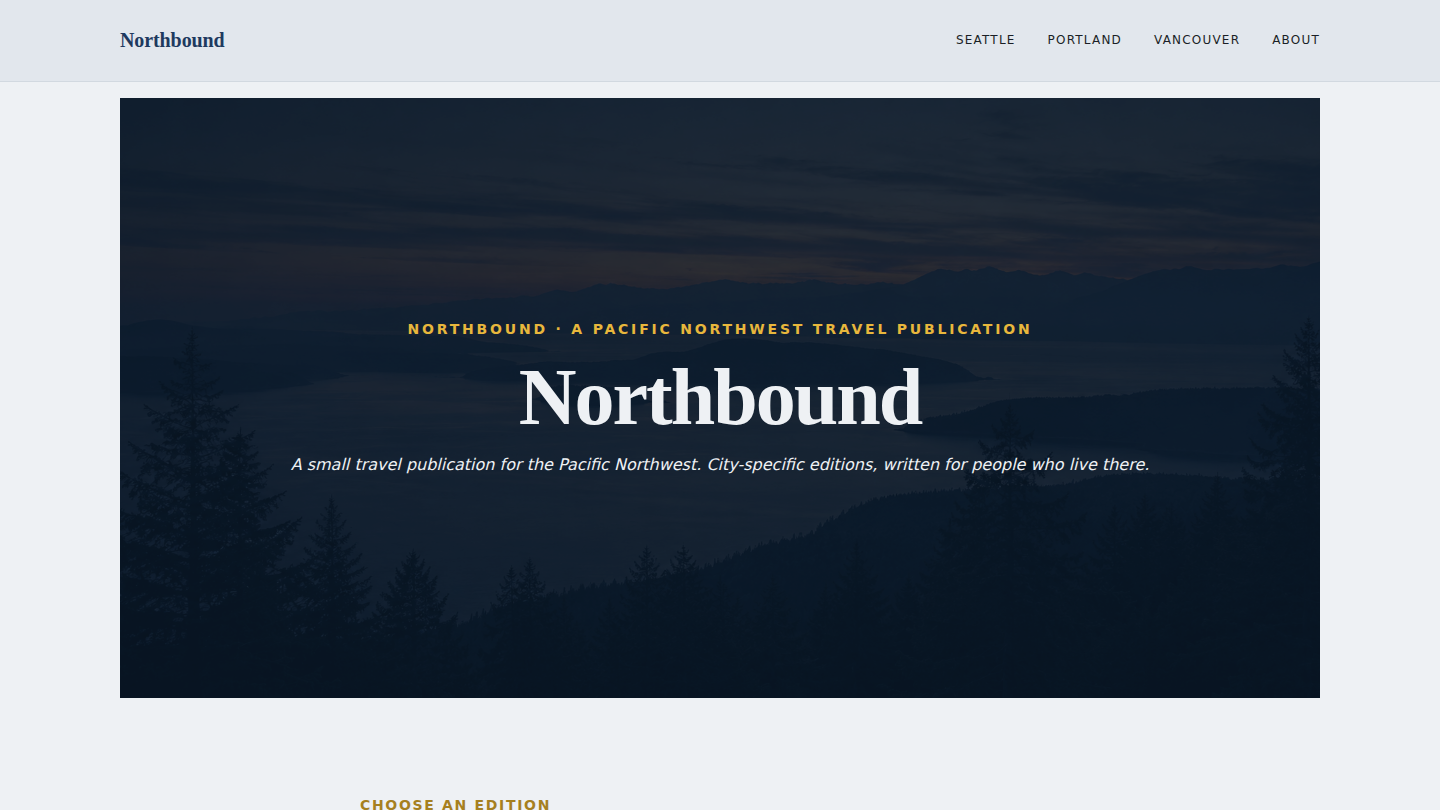
A fictional small Pacific Northwest travel publication — Northbound — built on WordPress Multisite. One install, one TLS cert, one A record, one database, four sites: a network root landing plus three city editions (Seattle, Portland, Vancouver BC). Eighth demo on the platform; first to demonstrate the multisite / network architecture pattern that universities, franchises, and multi-brand publishers all hit when they want one chassis serving many distinct surfaces. Live at northbound.wp.philiprehberger.com.
The challenge
The multisite use-case is the one where the canonical alternative isn’t “a different CMS” — it’s “ten separate WordPress installs.” A university with twenty departments, a franchise chain with thirty locations, a publisher with five imprints — the natural shape of the problem is “many distinct surfaces, one shared chassis.” Without multisite the answer becomes: spin up ten separate WP installs, run ten separate deploys, push the same theme update ten times, manage ten separate databases, hope nobody’s admin password drifts. It works but it’s a maintenance tax that grows linearly with site count.
WordPress Multisite is the answer the platform was built for. It’s also the WordPress feature most freelancers skip on their portfolio because the setup involves wp-config constants, .htaccess rewrites, network-admin awareness, and a wp-cli vocabulary (wp site create, --url= targeting, wp theme enable --network) that’s not in the standard single-site tutorial flow. Northbound is the worked example: provisioned via the standard script, converted to multisite in three commands, four sites running in twenty minutes after conversion.
The approach
Subdirectory multisite, not subdomain. Subdomain multisite (seattle.northbound.wp.philiprehberger.com) needs wildcard DNS on the parent zone (*.northbound.wp.philiprehberger.com) plus a wildcard TLS cert. The platform doesn’t carry either — every demo so far has been a single A record + a per-domain Let’s Encrypt cert. Subdirectory multisite gets us four sites under the single A record + single cert we already have. URLs become /seattle/ instead of seattle.; that’s the only visible difference, and for editorial publications it’s arguably more readable anyway.
Standard provisioning + post-provision multisite conversion. The provisioning script (provision-demo.sh) doesn’t know about multisite — and it doesn’t need to. We provision Northbound as a normal single-site WordPress install, then run three commands to convert: wp config set WP_ALLOW_MULTISITE true, wp core multisite-convert, and a manual flip of SUBDOMAIN_INSTALL to false in wp-config.php (the convert command’s --subdomains=false flag was parsed as truthy in our wp-cli version, so the install came up as subdomain mode the first time and we had to flip it). Then four wp site create --slug=<city> calls bootstrap the sub-sites.
One theme, network-activated, with per-site static-page front pages. The Northbound theme is enabled at the network level (wp theme enable northbound --network) and explicitly activated on each site. Each sub-site sets show_on_front=page and pins a static “city home” page that contains the city-specific hero + an inline core/query block listing recent posts. This avoids a multisite-specific template-hierarchy gotcha that cost about ninety minutes during the build (see “Tradeoffs” below).
What’s on the site
- Network root (`/`). Marine cover hero with yellow accent eyebrow, big Cardo serif title, italic Pacific-Northwest tagline. Below: “Choose an edition” + three city cards (Seattle / Portland / Vancouver) each linking to its sub-site, plus an /about/ page describing the publication and how the multisite model works
- /seattle/. Static city-home page (
seattle-home) with hero + tagline + 3-column grid of recent posts. Three sample posts: “A 90-minute Ballard Locks walk”, “Pike Place chowder, honestly”, “A Saturday on Bainbridge”. Each post has its own URL (/seattle/ballard-locks-walk/) and is queryable / editable only from the Seattle site’s admin (`/seattle/wp-admin/`) - /portland/. Same shape as Seattle. Three posts: a Forest Park hike that isn’t Lower Macleay, the Portland bookstore that isn’t Powell’s, a Southeast Saturday walk
- /vancouver/. Three posts: walking across the Lions Gate, Cantonese restaurants in Richmond, the Stanley Park seawall clockwise
- Per-city `/seattle/about/`, `/portland/about/`, `/vancouver/about/`. Each city has its own About page with the city editorial voice
- Demo banner across the top of every page on every site, explicit about the multisite (subdirectory network) pattern being the demonstration
The stack in detail
_chassisparent theme — templates, parts, patterns, gotcha-busting CSS, filemtime-based stylesheet enqueue. Inherited from the platform via symlink (each multisite is just one install, so the symlink chain is unchanged)northboundper-demo theme (this repo) — declaresTemplate: _chassis, ships the marine + warm yellow + pale gray-bluetheme.jsonand Cardo serif headings. Network-activated across all four sites. Templates:front-page.html,page.html,home.html(city blog index),single.html- WordPress 6.x Multisite (subdirectory mode) — one database, one TLS cert, one A record, one set of multisite constants in
wp-config.php(MULTISITE=true,SUBDOMAIN_INSTALL=false,DOMAIN_CURRENT_SITE=northbound.wp.philiprehberger.com,PATH_CURRENT_SITE=/) sfp-blocksplugin and the foursfp-*mu-plugins inherited from the platform;northbound-banner-config.phpfilters the demo banner for the multisite context- Multisite-specific
.htaccessrewrites (the WP-CLI install output documents the exact rules) sitting at the document root; standard non-multisite rewrites wouldn’t route the sub-site URLs correctly - Apache 2.4 + PHP 8.3 + MySQL 8 on EC2 (the same single-vhost setup as every other demo; multisite is invisible at the Apache layer)
.scripts/seed-pages.sh— idempotent multisite-aware seed: ensures the three sub-sites exist (creating them viawp site createif missing), network-activates the theme + plugin, then per-site creates a city-home page, three sample posts with city-specific narrative, and an About page. Every wp-cli content call targets a specific site via--url=
Where we made tradeoffs
Subdirectory over subdomain. Documented above; the dispositive constraint is the lack of wildcard DNS on the platform. Subdomain multisite is the right answer when the sub-sites are organizationally autonomous (each department wants its own subdomain) or when SEO concerns favor separate hostnames. For Northbound’s case — one publication, three editions of the same brand — subdirectory reads more naturally anyway. The only operational cost is that the per-site wp-admin URL is /seattle/wp-admin/ instead of seattle.northbound.wp.philiprehberger.com/wp-admin/; cosmetic, not functional.
The chassis-front-page fallback gotcha. The biggest time-sink of the build wasn’t multisite specifics — it was a template-hierarchy interaction with the parent theme. The northbound theme initially shipped only front-page.html (cloned from a previous demo). When show_on_front=posts on a sub-site, WordPress should use home.html — but if that’s missing in the child theme, WP falls back to front-page.html, which (cloned from blockset) was meant for static pages. So we deleted front-page.html assuming home.html would take over. Instead, WP fell back to _chassis/templates/front-page.html — the chassis’s own front-page composition, which is a shop-style pattern composition that ended up rendering on the Northbound network root. The visible symptom was the network root showing the ScopeForged Library’s default pattern content. Fix: restore front-page.html in the demo theme (rendering core/post-content) AND switch each sub-site to show_on_front=page with a static city-home page that has an inline core/query block. Documented as gotcha #21 in the platform guide so the next demo doesn’t pay for it again.
The --subdomains=false flag was parsed as truthy. Our wp core multisite-convert --subdomains=false call resulted in subdomain multisite being installed despite the explicit flag — the convert command appears to interpret any value (including false) as setting the flag. The fix was to flip SUBDOMAIN_INSTALL manually in wp-config.php after the convert and delete + recreate the sub-sites. Documenting here so the next attempt either uses the flag without a value, or explicitly sets the constant before calling convert. Either approach works once you know which one to do; nothing about the error message points you toward the fix.
One theme, no per-site variation. Network-activated themes apply uniformly across the network — same palette, same typography, same templates. We considered giving each city a per-site accent variation (Seattle teal-blue, Portland forest-green, Vancouver warm-sand) via a CSS class on body that’s set per-site. We left it off the initial build because the consistency is the point of a network site — readers should feel like they’re in different rooms of the same publication, not on different publications. A real client engagement might want per-edition accent treatment; the right hook is a body_class filter that adds has-edition-<slug> based on get_current_blog_id().
Outcomes
- Four-site multisite network live at northbound.wp.philiprehberger.com, end-to-end provisioned via the standard
provision-demo.shplus a five-line post-provision multisite conversion (config + convert + manual SUBDOMAIN_INSTALL flip + sub-site bootstrap) - Three city editions with their own content (3 posts per city, 9 sample posts total), each editable via per-site admin (
/seattle/wp-admin/, etc.), all sharing one chassis + one theme + one TLS cert - Lighthouse: 100 / 91 / 100 / 92 (perf / a11y / best-practices / SEO) on the network root. Multisite imposes no performance overhead on the front end — the multi-site routing happens at WordPress’s init layer and doesn’t add measurable latency
- Establishes the multisite pattern as a reproducible operation on the platform: clone an existing demo as a starting point, run the post-provision multisite-convert dance, write a seed script that loops over sub-site URLs. The next multisite demo would take ~3 hours end-to-end instead of the 6 this one took (most of the extra time went into the template-hierarchy gotcha)
- Surfaced the front-page fallback gotcha (now gotcha #21 in the platform guide) and the wp-cli subdomain-flag quirk — both worth knowing for the next time a demo on the platform involves removing an FSE template that the parent theme also provides