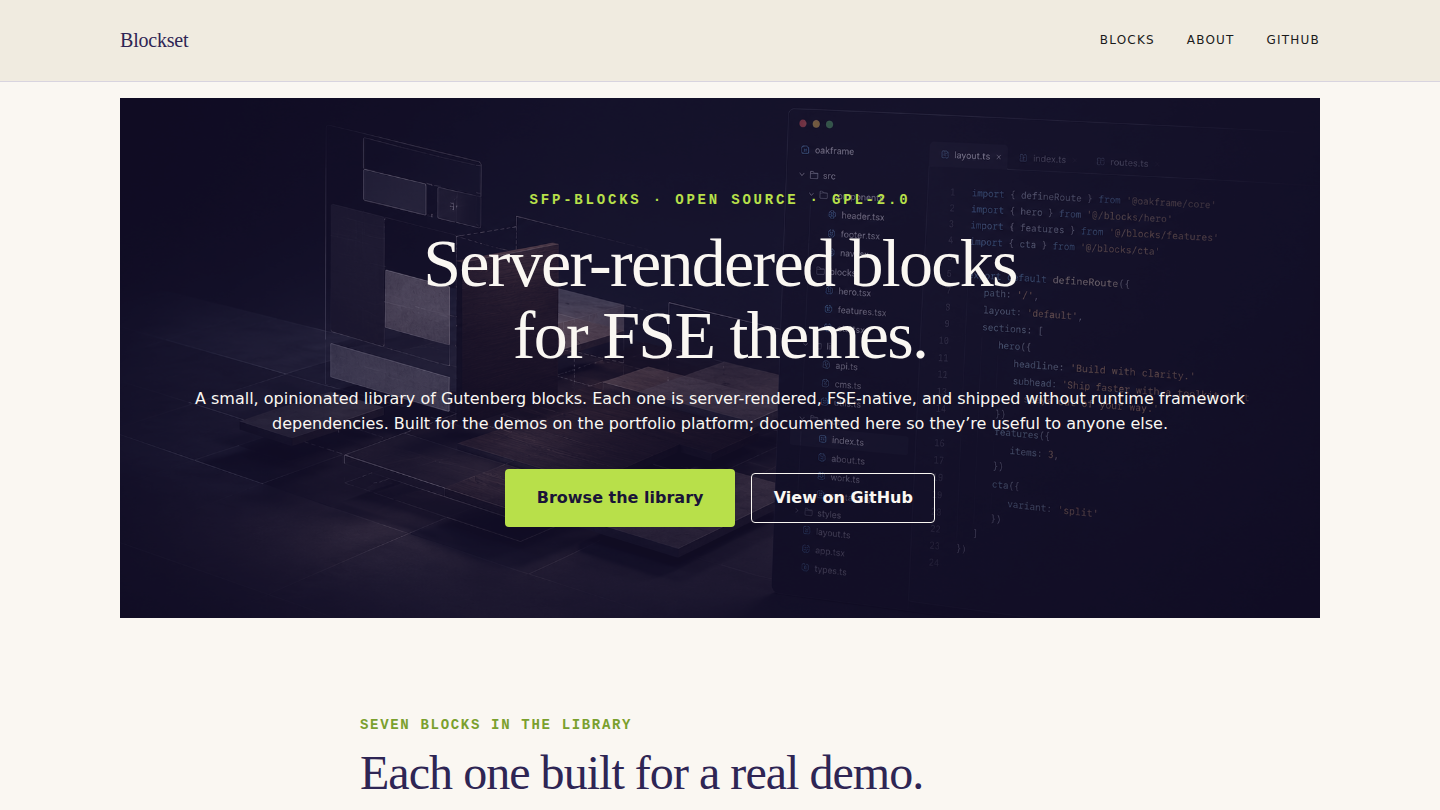
A meta-demo on the platform: a docs site for the platform’s own sfp-blocks shared block library. Seventh demo overall, and the first that uses the platform to document the platform — every per-block page shows the block live, lists its attributes, includes an example block-comment markup rendered by the new sfp-blocks/code-snippet block, and links to the GitHub source. Live at blockset.wp.philiprehberger.com.
The challenge
By demo #6 the platform had accumulated six custom Gutenberg blocks (test-card-helper, trust-stack, product-comparison, portfolio-grid, menu-section, listing-grid), each authored in service of a specific demo and each genuinely useful to anyone else building FSE-native sites. The collection wasn’t documented anywhere a potential client could see. The repo had a README per block buried two directories deep; the block plugin’s top-level docs were “see source”; the marketing surface was zero.
The challenge for Blockset was less “build a thing” and more “make the thing already built legible to people who haven’t read the source.” A potential client looking at the portfolio hub should be able to click “see what you mean by custom Gutenberg blocks” and land on a page that demonstrates, documents, and offers each block as a usable artifact — without the client having to install anything or open any source files.
The approach
Two architectural decisions. First, the docs site is itself a demo on the platform — not a separate static site, not a README in the GitHub repo, not a Notion page. The whole point is to demonstrate “what FSE-native blocks look like in production”; the meta-loop of having that demonstration BE an FSE site running the blocks it’s documenting was too good to pass up. Blockset uses the chassis, the chassis’s gotcha-busting CSS, the standard provisioning script, and the same deploy + seed pipeline as every other demo on the platform. The only thing it does differently is that its content is the block library.
Second, a new shared block: sfp-blocks/code-snippet. Built specifically for Blockset because every per-block docs page needs to show the example block-comment markup, and the existing “render some code” options were either (a) Gutenberg core’s core/code which is a plain <pre> with no language label or copy button, or (b) third-party syntax-highlighting plugins that ship 50+ KB of JavaScript per page. Code-snippet is a thin middle ground: server-rendered, language label in the header, optional caption, ~1 KB of inline view.js for the copy-to-clipboard. No syntax highlighting (intentional — if a client wants Prism or Shiki they can layer it on; if they don’t, they save the 50 KB). First consumer is Blockset; available to every future demo that needs to display code.
Hierarchical pages over a CPT. Each per-block doc lives at /blocks/<name>/ using WordPress’s native parent-page URL nesting; the parent is /blocks/ which is itself a normal page with a query-loop block showing every child. Saltcedar uses a CPT for its listings because they have structured meta worth indexing; Blockset has seven prose pages with no shared structure beyond a common template, so pages with post_parent are the right shape. Different content; different choice; both right.
What’s on the site
- Home. Indigo cover hero with lime accent + mono-font eyebrow (“SFP-BLOCKS · OPEN SOURCE · GPL-2.0”), Newsreader serif headline (“Server-rendered blocks for FSE themes”), browse + GitHub CTAs. Below: a “what each block came from” paragraph and a three-column auto-query grid of every per-block doc page, alphabetical, with title + excerpt + “View docs”
- /blocks/. Same auto-query grid plus a “How to install” panel at the bottom (clone the whole platform, or copy just
plugins/sfp-blocks/and runnpm install && npm run build) - /blocks/{name}/. Seven per-block docs pages (alphabetical: code-snippet, listing-grid, menu-section, portfolio-grid, product-comparison, test-card-helper, trust-stack) — each with mono-font block-name eyebrow, big Newsreader title, tagline, a “Live” section that renders the block with sample attributes, an “Attributes” table (name / type / default / description), an “Example markup” section using the new code-snippet block to show the block-comment markup, and a GitHub source link card
- /about/. “A small library. Built deliberately.” — the five design rules (server-rendered, FSE-native, minimal JS, single attribute shape per block, one first consumer), the split between chassis and blocks, and the license + support boundary (GPL-2.0, no warranty, fork if useful)
- Demo banner across the top of every page making it explicit that Blockset is itself the platform’s own block library
The stack in detail
_chassisparent theme — templates, parts, patterns, gotcha-busting CSS, filemtime-based stylesheet enqueue. Inherited from the platform via symlinkblocksetper-demo theme (this repo) — declaresTemplate: _chassis, ships the indigo + lime + creamtheme.jsonwith Newsreader serif for headings and system mono for code labels. Customparts/header.html(Blocks / About / GitHub) andparts/footer.html(library + built-by). Only two templates:front-page.htmlandpage.html— the rest of the routing is plain WordPress page hierarchysfp-blocks/code-snippet— the new shared block, server-rendered, lives atplugins/sfp-blocks/src/code-snippet/in the platform repo. Renders code in a dark-themed pre+code with a small language label in the header, an optional caption underneath, and a copy-to-clipboard button enhanced by ~1 KB ofview.jsusingnavigator.clipboard.writeText. The copy button delegates on document and reads its target ID from a data attribute, so it works even if blocks are added/removed dynamicallysfp-blocks/trust-stack,sfp-blocks/product-comparison,sfp-blocks/test-card-helper,sfp-blocks/portfolio-grid,sfp-blocks/menu-section,sfp-blocks/listing-grid— the existing six blocks, each documented on its own page- Four
sfp-*mu-plugins inherited from the platform;blockset-banner-config.phpfilters the demo banner copy - WordPress 6.x · PHP 8.3 · MySQL 8 on Apache 2.4 (the same EC2 t3.small that hosts every other demo)
.scripts/seed-pages.sh— idempotent seed that builds the three top-level pages (home, blocks, about), patches the right parent ID into the home + blocks-index query loops, then constructs the seven per-block docs pages from a reusablebuild_block_dochelper (title + tagline + live demo + attribute rows + example markup + GitHub link) and sets the per-block excerpts so the cards render with a meaningful hook
Where we made tradeoffs
No syntax highlighting on code-snippet. The block ships without Prism, Shiki, or any other syntax highlighter. The reason is asset weight: Prism is ~50 KB minified for a useful language set; Shiki is more. The blocks library’s whole positioning is “FSE-native, minimal JS, server-rendered” — importing a 50 KB highlighter just for the docs site would contradict the brand. A future user who wants highlighting can layer it on with a custom view.js that targets .sfp-code-snippet code[class*="language-"] and runs whichever highlighter they prefer. Documenting this as a deliberate choice, not an oversight; the block’s docs page mentions it explicitly.
The “Live” section on listing-grid is empty. The listing-grid block queries posts of a configured post type (default: listing) and renders cards. Blockset doesn’t have a listing CPT — that’s a saltcedar-local concept — so the live demo on /blocks/listing-grid/ renders nothing. We considered seeding a fake CPT just for the demo, but the right answer is that the docs page links to the saltcedar deployment where listing-grid IS in production with real content. The “Live” section is honest about its emptiness; the rest of the page (attributes, example markup, GitHub link) is what makes the docs useful. Documenting as a known gap; would be fixable with a fake CPT + 3 sample posts at cost of ~30 lines of seed.
Hierarchical pages over a CPT for the per-block docs. A block CPT would give us cleaner separation between “blockset content” and “blockset config pages” — but it would also require a custom single-block.html template, a CPT registration mu-plugin, and rewrite rules. With seven pages of prose content, the parent-page approach got us the right URLs (/blocks/<name>/) for free, made editing in the block editor more discoverable for a future maintainer, and avoided the duplication of “we already have a CPT pattern in saltcedar.” Different shape calls for a different structure. The pattern that scales here is “match the structure to the content, not the convenience of the developer.”
Outcomes
- Ten-page docs site live at blockset.wp.philiprehberger.com, end-to-end provisioned via the standard
provision-demo.shscript - One new shared block authored, deployed, and committed to the platform:
sfp-blocks/code-snippet. ~80 lines of PHP for the render, ~30 lines of view.js for the copy button. Used immediately by Blockset on every per-block docs page; available to any future demo that needs to display code without dragging in a syntax highlighter - Lighthouse: 99 / 96 / 100 / 92 (perf / a11y / best-practices / SEO). The chassis’s asset hygiene continues to pay off; the code-snippet block’s view.js loads only when a code-snippet is on the page, and the total JS weight per pageload is under 2 KB
- The block library now has a public surface that a potential client can land on without reading source. Each block’s docs page links back to GitHub for the people who want to read source; the live demo and the attribute table are for the people who want to evaluate quickly
- Greenfield-to-live in approximately five hours including the new code-snippet block (build + view.js + render + SCSS), the per-demo theme, the seven per-block docs pages with their reusable template helper, and this writeup. The pattern is now established for documenting any future additions to the block library — a new block becomes a new page in
build_block_doccalls, and the home + blocks index query-loops pick it up automatically