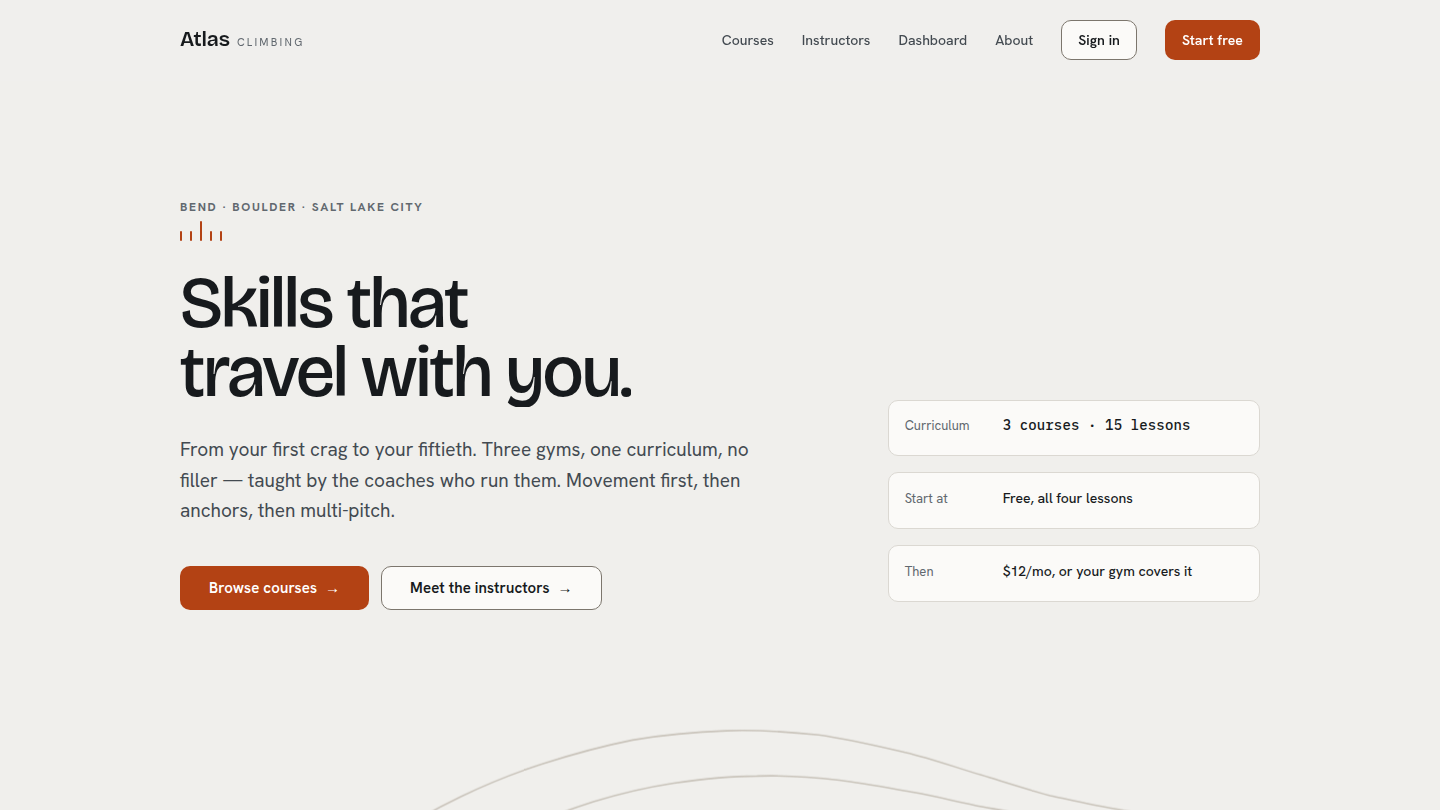
A fictional three-gym climbing chain — Atlas Climbing, in Bend, Boulder and Salt Lake City — selling three online courses their own head coaches wrote. The platform’s demonstration of user state: enrollment, real lesson completion, a logged-in dashboard and a lesson player, on Tutor LMS Free and no paid plugin. Rebuilt in 2026 against a full design system. Live at atlas.wp.philiprehberger.com.
The challenge
Every other demo on this platform is a brochure: a visitor arrives, reads, and either contacts the business or does not. Nothing on any of them changes depending on who is looking. That leaves the most common serious WordPress request unanswered — the one where people log in, and the site has to remember what they did last time.
The prevailing answer to “I want to sell courses” is a hosted platform at $99–299/month, or LearnDash plus three add-ons at around $800 a year, on the assumption that course delivery is inherently expensive software. It is not. Tutor LMS Free handles courses, lessons, topics, quizzes, enrollment and completion perfectly well. What it does not handle is looking like anything other than Tutor LMS.
The approach
The site implements the Atlas Climbing design system, which rests on granite and chalk: stone grays and chalk white, one rope-orange accent, and contour linework borrowed from a topographic map as the only texture. No photography stock, no gradients, no gym-tape rainbow. The pages are quiet and the movement is what makes them feel alive — which is also the pedagogy: movement first, then anchors, then multi-pitch.
The architectural decision that follows from it: Tutor is the data layer, and the theme owns every screen a learner sees. The marketing pages, the course page, the lesson player and the dashboard are all this theme’s own templates, reading Tutor through a single wrapper. Tutor keeps the quiz runner and the account screens, where its own UI is already the right answer.
Two themes ship, Chalk and Basalt, and two tokens exist purely for the one inverted band on each page — because the accent flips lightness between themes and the normal accent fails contrast on the dark ground. That is the kind of detail that gets “simplified” away by someone who has not checked the arithmetic.
What’s on the site
- Home. A hero with a word-by-word headline rise over a contour field that draws itself in and drifts on scroll, the three courses as cards with their own corner contours, the three instructors, a real lesson list shown before anyone pays, a preview of the logged-in dashboard, and the pricing band
- /courses/ and each course page. Title with its difficulty meter and a meta line of real quantities, the instructor row, and the lesson list as the spine of the page with checkpoints inline and a sticky continue tile beside it. No hero image — the system does not have one
- The lesson player. Breadcrumb, title, video, body, “Complete and continue”, and the course’s lesson list in the rail so the states are identical from the dashboard into the lesson
- /dashboard/. A dark strip with the greeting, a 280px rail, and a fluid main holding the continue tile, a progress ring per enrolled course, and the current course’s lessons. No charts, no streaks, no badges — progress here is a fact, not a game
- /instructors/ and /about/. The three coaches at full width with their credentials and the courses they teach, and the gyms
The stack in detail
A per-demo theme (atlas) on the platform chassis, thirteen demo-local blocks, and a Tutor data layer that everything else goes through. Tokens live in one CSS file and theme.json declares its palette as var() references into it, so every WordPress preset follows the reader’s theme. Bricolage Grotesque, Hanken Grotesk and IBM Plex Mono are self-hosted as woff2. Every quantity on the site — lesson counts, durations, fractions like 03 / 06 — is set in the mono face with tabular figures, which is most of what makes it read as a teaching tool rather than a brochure.
One file talks to Tutor. Not because layering is virtuous, but because Tutor’s API is not stable between versions: is_enrolled(), get_lesson_count_by_course() and get_course_by_lesson() are all in the documentation and none of them exists in 4.0.9. Enrollment turns out to be a post whose parent is the course and whose author is the student; completion is a user-meta row per lesson; and a lesson’s duration is not a duration field at all — it lives inside the serialised video meta. Thirteen blocks calling that directly would be thirteen things to fix on the next Tutor release.
Taking the templates back without forking the plugin. Tutor renders its own course archive, course page and lesson view by filtering template_include. The obvious reaction is to override Tutor’s templates in the theme, which is exactly the thing that breaks on a plugin update. The better route: WordPress resolves the block template into $_wp_current_template_content in get_query_template(), before template_include runs — so Tutor has replaced the path but not the content. Filtering at a priority above Tutor’s and handing the block canvas back reclaims the view, with a guard so anything we have not designed falls through to Tutor untouched.
Completion writes Tutor’s own data. The “Complete and continue” control is an ordinary form post to admin-post.php that works with JavaScript off, and it writes the same user meta Tutor reads — so Tutor’s screens, its percentages and any future Tutor feature all stay in agreement. No parallel progress store.
The contours are generated in PHP. The approved page builds every topographic path in JavaScript from a small contour function, which keeps its markup tiny. Here they are emitted server-side, so the one piece of visual furniture this system has is in the markup before any script runs. The port is a transliteration rather than a reimplementation, and it produces byte-identical path data to the original across all 22 contours of the three presets — verified by diffing them, because “looks about right” is not a standard for geometry.
Where we made tradeoffs
Reversing the earlier call on Tutor’s templates. The first version of this demo deliberately left Tutor’s archive and course views alone and themed them with CSS, on the grounds that unhooking template_include is the kind of thing that breaks on an update. That was correct when the goal was a themed Tutor. It stopped being correct once the design specified a course page and a dashboard that are not shapes Tutor’s markup wants to make. The current approach is narrower than unhooking anything: Tutor’s filters still run, and we hand the canvas back afterwards only for the two views we actually designed.
Nothing is locked, and the pricing panel says so. The design specifies a $12/mo tier and locked lesson rows. This install has no monetization configured and every course is open. Wiring a real checkout onto a portfolio demo means a payment gateway and a cart that anyone clicking through actually reaches; faking one means a paywall that is a lie. The third option was taken: the locked state is driven by an explicit local rule — the free course never locks, and on the others a visitor who is not enrolled sees the first three lessons and the rest marked Members — and the panel states in words that there is no checkout behind it.
Progress animates from zero, and the motion spec asked for otherwise. The specification is that a ring tweens from its previous value, so a learner who finishes a lesson sees the arc advance rather than restart. Tutor stores current completion and no history. Delivering it properly would mean writing a per-user snapshot on every dashboard render — a write on a read path, and a new meta key to maintain, for one beat of animation. The ring sweeps from empty instead, and the helper takes a starting value if that trade is ever worth making.
Photography where the system allows it, and nowhere else. The brand book says there is no photography in the system and none is required — and then provides for it: real climbing photography goes in square-cornered wells on the sunken ground. The course cards and the course page are explicitly excluded, which is precisely where a photograph would look like an improvement. So the About page carries the climbing shots and the gym interiors, the instructor discs carry real portraits — the card spec provides for those too, in a clause easy to read past — and the cards keep their contour marks.
Outcomes
- A course platform with real logged-in state live at atlas.wp.philiprehberger.com, on Tutor LMS Free and no paid plugin
- Lighthouse on the live site: 100 / 100 / 100 / 100 on desktop for the homepage and the instructors page (97 performance on About, which carries six photographs), and 81 / 100 / 100 / 100 under the platform’s own weekly run on Lighthouse’s default mobile profile. Accessibility and SEO hold at 100 in both. CSS and JavaScript together are 13.8 KB gzipped
- 307 automated checks covering the handoff’s definition of done — five pages at three widths in both themes, reduced motion, JavaScript disabled, keyboard operation, a grayscale check that no lesson state is signalled by color alone, and a signed-in pass that completes a real lesson and puts it back
- Found a data-corruption bug that had been shipping since the demo was built: the seed wrote Tutor’s video meta as hand-written serialized PHP with a string length off by one, so every lesson duration read as zero and Tutor’s own duration helper returned zeroes too — which is what made it look like the plugin’s fault rather than ours
- Four more platform-level gotchas into the shared guide, including the one that cost the most: a block’s
render.phpis copied into the build directory, so a render edit without a rebuild is invisible with no error anywhere. Both block-based demos now build before they verify - The demo that answers “can WordPress do the logged-in part” without reaching for a hosted platform or a four-figure plugin stack