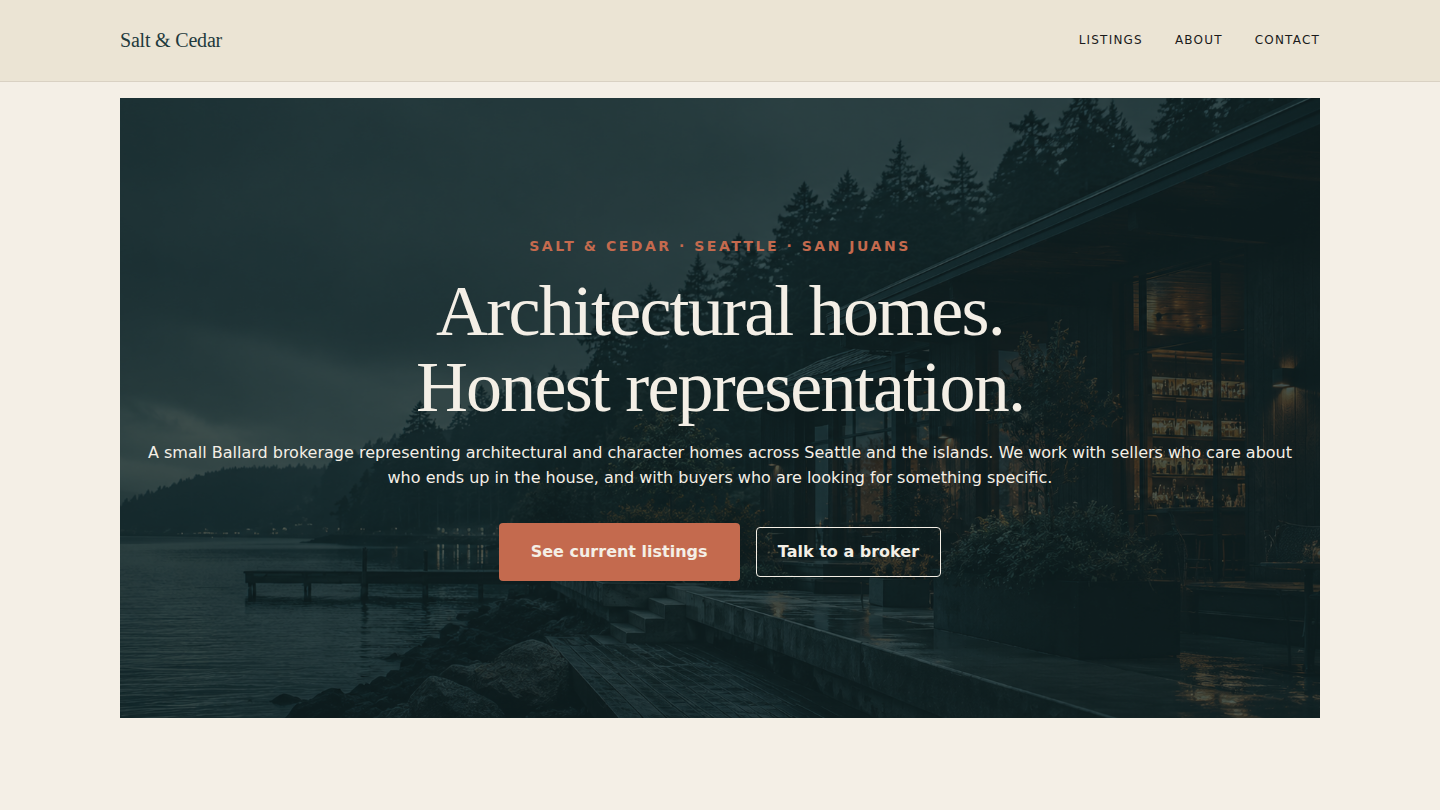
A fictional boutique residential brokerage — Salt & Cedar — built to argue that WordPress is the right stack for the CPT + custom-meta + faceted-catalog request that real estate, equipment leasing, vehicle dealers, and rentals businesses all hit. Fifth demo on the platform, and the first consumer of a new shared block (sfp-blocks/listing-grid) that any future CPT-driven catalog demo can drop straight onto a page. Live at saltcedar.wp.philiprehberger.com.
The challenge
Real estate brokerages are the canonical case where agencies skip WordPress on reflex. The reasoning is usually some mix of “MLS plugins are awful,” “faceted search needs a SaaS,” and “we’ll lose six months to plugin compatibility nightmares” — so brokerages end up on the bundled site that came with their MLS subscription, or on a hosted real-estate-specific CMS that costs $200/month and ages badly. The narrative is that WordPress is for blogs and stores; for anything where the unit of content is a structured listing rather than a page, you need a different stack.
That narrative confuses “boutique brokerage with twelve curated listings” with “MLS aggregator serving twenty thousand auto-feed listings.” For the former — which is most of the real-estate work an agency actually gets asked to build — WordPress’s CPT + custom meta + taxonomy + block-editor pipeline is more than sufficient. The trouble is that the canonical implementation of this pattern doesn’t exist on most freelancer portfolios, so the conversation never gets started. Salt & Cedar is the worked example.
The approach
Three architectural decisions worth naming up front. First, a per-demo theme (saltcedar) on the platform chassis, with a slate-teal + warm-rust + bone palette and Fraunces serif headings — distinct enough from Hillcrest’s forest + brass and Winebar’s navy + brass to read as a different brand at a glance, while still inheriting all the chassis’s asset hygiene and gotcha-busting CSS.
Second, a new shared block: sfp-blocks/listing-grid. Server-rendered. Takes a configurable post type, posts-per-page, columns, ordering, and optional taxonomy filter as attributes; runs its own WP_Query; renders each result as a card with featured image, title, price, beds/baths/sqft fact triplet, location, and CTA. Lives in the shared platform plugin. First consumer is Salt & Cedar’s home page (three featured listings) and the /listings/ archive (full six-listing grid); available to any future CPT-catalog demo with zero additional integration work.
Third — and this is the architecturally important one — the listing custom post type and its home_style taxonomy stay local to the demo, not in the shared platform. The block knows nothing about real estate; the demo knows everything about real estate. saltcedar-listing-cpt.php in the demo’s own mu-plugins directory registers the CPT, the taxonomy, and nine meta fields (price, beds, baths, sqft, lot_sqft, year_built, neighborhood, address, mls_id) — all with show_in_rest: true so the editor and the block can both read them. A future vehicle-listings demo would register its own vehicle CPT with different meta (year, mileage, drivetrain), point the same listing-grid block at postType=vehicle, and get a working catalog page without touching the platform plugin.
What’s on the site
- Home. Teal cover hero with rust eyebrow (“Salt & Cedar · Seattle · San Juans”), Fraunces headline (“Architectural homes. Honest representation.”), reservation + tour CTAs. Below: a three-card row of featured listings via the listing-grid block, and a brokerage-story strip with a “more about us” link
- /listings/. The CPT archive page, rendered by the theme’s
archive-listing.htmlFSE template — intro paragraph above, a six-card three-column listing-grid below. No separate “/listings/” page is needed; the archive IS the page - /listings/{slug}/. Six single-listing pages (Bayview Mid-Century, Madrona Bluff Craftsman, Westcott Bay Cottage, Queen Anne Contemporary, Vashon Forest Cabin, Eastsound Farmhouse) rendered by
single-listing.html— hero image, taxonomy eyebrow, big title, then a facts panel (price, beds/baths/sqft, year, neighborhood, address, style, MLS, lot size) and a narrative built from real-estate-specific prose - /about/. Brokerage philosophy (“why small, on purpose”), what they look for in a listing, and two-up agent bios (Sara, city principal; Marco, islands partner)
- /contact/. Two-card layout — “tour a listing” (email + phone for direct showing scheduling) and “free 40-minute consult” (for buyers/sellers who haven’t engaged yet) — plus an office address strip
- Demo banner across the top of every page making it explicit the brokerage is fictional
The stack in detail
_chassisparent theme — templates, parts, patterns, gotcha-busting CSS, filemtime-based stylesheet enqueue. Inherited from the platform via symlinksaltcedarper-demo theme (this repo) — declaresTemplate: _chassis, ships the slate-teal + warm-rust + bonetheme.json, Fraunces serif + system sans typography, customparts/header.html(Listings / About / Contact) andparts/footer.html(brokerage bio + office + contact strip). Owns four templates:front-page.html,page.html,archive-listing.html, andsingle-listing.htmlsfp-blocks/listing-grid— the new shared block, server-rendered, lives atplugins/sfp-blocks/src/listing-grid/in the platform repo. Configurable post type / posts-per-page / columns / orderby / order / taxonomy filter / show-price / show-facts / show-location / CTA label. Two consumers on day one (home page featured row, archive page full grid); available to every future CPT-catalog demosaltcedar-listing-cpt.php(demo-local mu-plugin) — registers thelistingCPT withhas_archive: 'listings', thehome_styletaxonomy with six seeded terms (mid-century / craftsman / contemporary / cottage / farmhouse / classic), and nine meta fields with REST exposuresfp-blocks/menu-section,sfp-blocks/portfolio-grid,sfp-blocks/trust-stack,sfp-blocks/product-comparison,sfp-blocks/test-card-helper— inherited from the shared plugin (not consumed by Salt & Cedar)- Four
sfp-*mu-plugins inherited from the platform;saltcedar-banner-config.phpfilters the demo banner copy for real estate - WordPress 6.x · PHP 8.3 · MySQL 8 on Apache 2.4 (the same EC2 t3.small that hosts every other demo on the hub)
.scripts/seed-pages.sh— idempotent seed that resolves placeholder vs supplied photos for 10 images, uploads viawp media importwith the standard<name>-imageattachment-slug rename, creates or refreshes sixlistingCPT entries with featured images + meta + taxonomy + narrative bodies, upserts three pages, and pins Home as the front page
Where we made tradeoffs
The CPT lives in the demo, not the platform. The temptation was to put listing + home_style in the shared sfp-blocks plugin so future real-estate demos could inherit them. We resisted because that’s the wrong abstraction. The block is the generic primitive (query any post type, render cards); the CPT is the domain model (real estate has prices and beds; vehicles have mileage and drivetrains). Mixing them would force the platform to grow a coupled “what kind of catalog is this” notion that doesn’t belong there. The right split: shared block, demo-local CPT. A future vehicle-listings demo registers its own vehicle CPT with its own meta, points the listing-grid block at it, and works. The platform stays generic.
Listing-grid card meta keys are hardcoded to real-estate conventions. The block reads price, beds, baths, sqft, and neighborhood from post meta by name. We considered making these configurable (a JSON map of “fact keys to display”) but the additional knobs would have doubled the editor surface for a marginal gain. The block name is listing-grid; allowing it to know listing conventions is honest. If a vehicle demo wants different facts in the card body, the right move is a sibling block (sfp-blocks/vehicle-grid or similar) that shares the query infrastructure but renders different facts. Documenting this here so the next demo doesn’t relitigate it.
No faceted filter UI on first ship. A serious real-estate site wants chips along the top of the archive (“Mid-century · Under $1M · Islands”) that filter the grid in place via URL params or a tiny JS layer. We left this off the initial build because the six listings comfortably fit a single page, and adding a faceted-search layer would have meant either (a) a JS bundle that contradicts the chassis’s zero-JS marketing stance, or (b) a server-rendered filter that does a page reload on every chip toggle. Both are real options; both are worth a separate iteration. The current archive page uses the taxonomy archive instead — /style/mid-century/ filters to that one style via WP’s native taxonomy routing — which is the WordPress-native answer to faceting and works without any added code.
Outcomes
- Four-page marketing site plus six CPT listings live at saltcedar.wp.philiprehberger.com, end-to-end provisioned via the platform’s
provision-demo.shscript - One new shared block authored, deployed, and committed to the platform —
sfp-blocks/listing-gridis now available to every future CPT-driven demo. The CPT + custom-meta + REST + block-render pattern is fully worked through and reusable - Lighthouse: 98 / 96 / 100 / 92 (perf / a11y / best-practices / SEO) on the homepage with placeholder photography. The chassis’s asset hygiene continues to pay off without any per-demo tuning; the new listing-grid block ships zero JavaScript
- The shared-block + demo-local-CPT split is now the standard pattern for any future catalog-style demo. Documented in this case study, codified in
saltcedar-listing-cpt.php’s structure, and ready to copy into a vehicle / rental / equipment / portfolio-of-anything demo with one mu-plugin file changed - Greenfield-to-live in approximately five hours including the new shared block, the demo-local CPT registration, the per-demo theme with two custom FSE templates (
archive-listing.html+single-listing.html), the six-listing seed, and this writeup. The block + CPT split is the part that paid for itself — most of the time went into the listing-grid render, which a future demo gets for free